Thursday, March 06, 2008

Starting My Media Center

I'm a huge hardware nerd. I'll be the first to admit it. One of my favorite ways to waste time on the Internet is by piecing together imaginary computers on Newegg. My interests really lie in creating efficient, fast, ergonomic computers, so a lot of my favorite hardware sites have some rather unconventional slants about them.

I get information from a number of hardware sites, but my favorites (listed in no particular order) are:
  • Silent PC Review - silence truly is golden. But it's more than just silence; how much power does your computer draw? How efficient (as in, work done verses energy used) are your components? People who can be fanatical about silence seem to be equally in tune with the overall quality and ergonomics of their system. This is what I find particularly endearing about SPCR.
  • AnandTech - A more general site, but it has a clean layout and generally good reviews.
  • XBitLabs - another general site. Good reviews, and great metrics for video card power consumption.
  • Jonny GURU - a finer power supply oriented site, there has never been. I truly enjoyed the article where he ran six junker PSUs through his rather vicious workbench, and managed to destroy all but one.
There are a few others, but these are the sites I frequent most.

Anyways, the point of this blog post is: I want a media center PC. In addition that that, I want the PC to run Slim Server software to power my squeezebox. In addition to that, I want it to run the video surveillance software that I develop.

So, let's get a sense of what I need. For media center, I need decent processor and graphics, ample disk space, and a spare USB port for the remote controller. For Slim Server, I need some network interfaces--pretty easy. For our software, I need another USB slot to hook up our receiver. I might also want an MX Air mouse, so a third USB would be useful.

Our software only runs on Windows, so that determines my operating system of choice: Windows Vista Premium SP1. Why not ultimate? Quite frankly, Ultimate doesn't have any features I'm interested in. I'd rather not have the extra crap.

I originally wanted to use my old Inspiron 600m, but the driver support in Vista is totally non-existent. The benefit of a laptop is the lower power consumption, but I have yet to figure out how to get it fully configured with Vista and my external monitor. So, for the time being, I'm scrapping this plan. The 600m is going to run Windows Home Server, which will also host SlimServer and my video surveillance software.

More in a bit; I'm going to post more specific hardware setups, and perhaps some network topology diagrams.

Thursday, November 29, 2007

How not to benchmark code.

The other day, I was searching for C# benchmarks. I came across this blog post. The "ultimate java verses C# benchmark" claims that:

The C# results? Well they're just too embarrassing to post. Suffice to say, it's several orders of magnitude slower! Furthermore, the memory usage exploded to who knows where! I can't believe that people may be thinking of deploying mission critical applications on this virtual machine!

Just like Cameron's benchmark, everything is self contained, you can cut and paste it, compile it and run it yourself. Better yet, send it to your resident C# expert, have him tweak it as much as he can. Bring a digital camera, capturing the anguish in his face when he realizes the truth, would be priceless.


...unfortunately my digital camera's batteries are hosed, so there will be nobody to capture the smile on my face as I tear this "benchmark" apart. The program put forth by the author "matches a DNA sequence against a million DNA patterns expressed as regular expressions." Both Java and C# variants of the program use java.util.regex.* and System.Text.RegularExpressions, respectively. Based on the authors's implementation, he concludes that "Java is at least 7,733x faster than C#."

Now I'm a pretty reasonable person. Seriously. I know that the .NET regex implementation has been shown to be slower than other implementations, but seven thousand times slower? Something is seriously wrong with the test.

The problem lies in how the C# benchmark was implemented:
Regex regexpr = new Regex(matchthis, RegexOptions.Compiled);

...what is this RegexOptions.Compiled flag? A blog post from the BCL team at Microsoft sheds some light:
In [the case of RegexOptions.Compiled], we first do the work to parse into opcodes. Then we also do more work to turn those opcodes into actual IL using Reflection.Emit. As you can imagine, this mode trades increased startup time for quicker runtime: in practice, compilation takes about an order of magnitude longer to startup, but yields 30% better runtime performance. There are even more costs for compilation that should mentioned, however. Emitting IL with Reflection.Emit loads a lot of code and uses a lot of memory, and that's not memory that you'll ever get back. In addition. in v1.0 and v1.1, we couldn't ever free the IL we generated, meaning you leaked memory by using this mode. We've fixed that problem in Whidbey. But the bottom line is that you should only use this mode for a finite set of expressions which you know will be used repeatedly.

Furthermore, the MSDN page on RegexOptions.Compiled has some very interesting commentary:
If a Regex object is constructed with the RegexOptions.Compiled option, it compiles the regular expression to explicit MSIL code instead of high-level regular expression internal instructions. This allows the.NET Framework's just-in-time (JIT) compiler to convert the expression to native machine code for higher performance.

However, generated MSIL cannot be unloaded. The only way to unload code is to unload an entire application domain (that is, to unload all of your application's code.). Effectively, once a regular expression is compiled with the RegexOptions.Compiled option, the .NET Framework never releases the resources used by the compiled expression, even if the Regex object itself is released to garbage collection.

You must be careful to limit the number of different regular expressions you compile with the RegexOptions.Compiled option to avoid consuming too many resources.
If an application must use a large or unbounded number of regular expressions, each expression should be interpreted, not compiled. However, if a small number of regular expressions are used repeatedly, they should be compiled with RegexOptions.Compiled for higher performance. An alternative is to use precompiled regular expressions. You can compile all of your expressions into a reusable DLL. This avoids the need to compile at runtime while still benefiting from the speed of compiled regular expressions.

What we can take away from this is:
  • RegexOptions.Compiled is intended for a small number of regular expressions which are used repeatedly, and in that instance, results in higher performance.
  • If an application must use a large or unbounded number of regular expressions, RegexOptions.Compiled should not be used.
What is our "benchmark" doing? It is creating a million Regex objects using RegexOptions.Compiled! If we correct this error, what is our performance like? I remeasured using the following C# program:
using System.Text.RegularExpressions;
using System.Text;
using System;
using System.Diagnostics;

namespace TestRegex
{

public class RegexBench2
{
private static String _doc = "CGAATCTAAAAATAGATTCGGACGTGATGTAGTCGTACAAATGAAAAAGTAAGCC";
private static int ITERATIONS = 1000000;

public static void Main()
{
Stopwatch sw = new Stopwatch();
sw.Start();

int length = 1;

for (int i = ITERATIONS; i <= ITERATIONS * 2; i++)
{
length = (int)(Math.Log((double)i) / Math.Log(4));
String matchthis = generateWord(i, length + 1);
Regex regexpr = new Regex(matchthis);

if (regexpr.IsMatch(_doc))
{
Console.WriteLine("found {0} at {1} it took {2} miliseconds", matchthis, i, sw.ElapsedMilliseconds);
}
}

Console.WriteLine(".NET regex took {0} miliseconds", sw.ElapsedMilliseconds);

}

public static String generateWord(int value, int length)
{
StringBuilder buf = new StringBuilder();
int current = value;
for (int i = 0; i < length; i++)
{
buf.Append(convert(current % 4));
current = current / 4;
}

return buf.ToString();
}

private static String convert(int value)
{
switch (value)
{
case 0: return "A";case 1: return "G";case 2: return "T";case 3: return "C";default: return "0";
}
}
}
}


My performance for the C# program was substantially better (as in, it actually completes) than the previous incarnation:


For the java program, I compiled using Eclipse 3.3.1.1 and the previous code the author used. The results were:
found AAAGTAAGCC at 1000000 it took 0 miliseconds
found AAATGAAAAAG at 1048960 it took 172 miliseconds
found GAAAAAGTAAG at 1085441 it took 265 miliseconds
found TCTAAAAATAG at 1179694 it took 547 miliseconds
found ACGTGATGTAG at 1204636 it took 625 miliseconds
found AATAGATTCGG at 1548576 it took 1578 miliseconds
found TCGTACAAATG at 1576094 it took 1656 miliseconds
found CGGACGTGATG at 1599255 it took 1734 miliseconds
found ATTCGGACGTG at 1689064 it took 1984 miliseconds
found AGATTCGGACG at 1859204 it took 2453 miliseconds
found TGATGTAGTCG at 1984902 it took 2797 miliseconds
found AAATAGATTCG at 2000000 it took 2843 miliseconds
Java regex took 2843 miliseconds

The java program is now roughly twice the speed of the C# program, which seems far more reasonable. The discrepancy resulted from misuse of the API; not from the C# regular expression implementation being seven thousand times slower than the Java implementation. The worst possible way to benchmark two language implementations is to incorrectly use one, and then compare it to a correct usage of the second. Obviously, the results are going to be skewed towards the language being used correctly.

The author's confusion probably stems over how the Java regex implementation uses a .Compile() method, but one has to wonder how he could seriously think the results were valid. The honest response to this would have been "Gee, 7,000x slower? Something must be wrong in my C# program!". The dishonest response is: "C# is a dog! 7000x slower? Java forever!"

On a more fundamental level, I completely disagree with the overall tone of the article. As the Computer Language Benchmarks Game points out,
Benchmarking programming languages?

How can we benchmark a programming language?
We can't - we benchmark programming language implementations.

How can we benchmark language implementations?
We can't - we measure particular programs.

You cannot benchmark a language, nor can you benchmark a language implementation. There is only performance for a specific program. So it's entirely possible that this one example posted isn't necessarily a strong indicator of overall performance. It's also possible that the results will change as both the Java and .NET implementations change over time.

Friday, October 26, 2007

Hardware Assisted Brute Force Attacks


Jeff Atwood recently blogged about a hardware assisted brute force password cracking product developed by Elcomsoft.

Using Elcomsoft's figures from a pdf they released, Atwood concludes that we can attempt this many passwords a second:


Dual Core CPU 10,000,000
GPU 200,000,000


...and using Elcomsoft's relatively weak 8-character alpha-based password (a-A, z-Z), there are this many passwords:


52^8 = 53,459,728,531,456


Some more basic math gives us:


53,459,728,531,456 / 10,000,000 pps / 60 / 60 / 24 = 61.9 days
53,459,728,531,456 / 200,000,000 pps / 60 / 60 / 24 = 3.1 days


To his credit, Atwood correctly assaults Elcomsoft's most questionable assumptions: allowing people only 8 characters, and using an extremely limited character set. Adding additional characters, it becomes clear that the exponent plays a rather sizable role. Here's the amount of time for twelve characters:


52^12 / 200,000,000 pps / 60 / 60 / 24 = 22,620,197 days


We can all agree that ~22 million days (about ~61,000 years) is an awful long time. But this is where Atwood makes an error:

For those of you keeping score at home, with a 12 character password this hardware assisted brute-force attack would take 61,973 years. Even if we increased the brute force attack rate by a factor of a thousand, it would still take 62 years.


The error here is pretty basic: over the next 62 years, what sort of new computing techniques will we develop? How much faster will GPUs run five years from now? Ten years from now? What did computing resemble 62 years ago?

I'll give you a hint:


This is ENIAC. It was the "first large-scale, electronic, digital computer capable of being reprogrammed to solve a full range of computing problems." In one second, it could perform:
  • 5,000 add or subtract operations
  • 357 multiply operations with two ten digit operands
  • 35 division or square root operations
...all of this, at a svelte 30 tons, while consuming 150 kW. This is state of the art in computing, roughly ~61 years ago.

Considering the operations being done to hash a password are substantially more complicated than simple arithmetic, how many passwords could ENIAC hash in a second? To be honest, I think it's more likely that this unit would be expressed in number of seconds per password rather than the number of passwords per second, but I'll be the first to admit that I'm not familiar enough with the NTLM hashing algorithm to say with certainty.

For the sake of argument (and not having to discuss a computing architecture that dates me by a good 35 years) let's assume that ENIAC can do one hash a second. This means our modern CPU is ten million times faster than ENIAC, or somewhere between 2^23 and 2^24 times the speed of ENIAC. The GPU is 2^27 to 2^28 times the speed of ENIAC. These are both commodity products, and ENIAC was state of the art, so a more fair comparison would be with something like Blue Gene, but I digress.

Using the above assumptions, this means that the number of hashes we can do should double every 2.25 years. This also means that it'd take 22.5 years for our current computing power to increase 2^10 (or 1024) times. Let's reread Jeff's statement:

Even if we increased the brute force attack rate by a factor of a thousand, it would still take 62 years.


...so this means that 22.5 years from now, a computer would still need another 62 years to crack the 12-character password, for a grand total of 84.5 years. But, if we increase our computing power by a million (2^20, or 45 years from now--it's no big deal, we just push the date out), it will only take .o62 years (roughly 22 days), or 45.062 years from today. If we increase our computing power by 2^27, it ends up being roughly 4.25 hours to crack a single 12 character password.

Obviously all of this is total speculation, with wild figures and estimates on my behalf that are obviously open to interpretation, huge questions about where computing will be 40 years from now, etc. But the point I'm trying to make is: it's a fallacy to assume today's computing power is what you'll have access to in a year. It's a gigantic fallacy to assume today's computing power is what you'll have access to in 20 years (what were you doing in 1987?). Discussing what we'll have at our disposal in 62 years is mind-boggling.

When we're computing the amount of time it takes to do something, it makes no sense to hold computing power constant, especially when we start talking about any amount of time in excess of a year. If we think it's going to take ten years to perform some computation, one viable option is to wait five years (at which point in time your computing power has quadrupled), kick off that batch job, and take a 2.5 year coffee break. It still took you 7.5 years, but that was 2.5 years saved.

Sunday, October 07, 2007

The Sorry State of Online Translation Tools


As of late, I've been working on a set of automated tools that query free online translation services to perform translations for some of our target languages. For example, all of our string data is in en-US, so we might request a fr translation from babelfish.

Yes, if you were paying attention, I am doing the unspeakable: I've developed an application to automate translation using AltaVista's translation services. Is it theft or abuse of their free services? Yeah, probably--but seriously: cry me a river. (If you're reading this, BabelFish, take note: your programmers are stupid. Yes, I said it. Stupid. You have the potential to offer a for-pay service, but your API is too deficient for it to be of any real use without jumping through ridiculous hoops.)

Anyways, this task has yielded some extremely interesting observations. AltaVista (BabelFish) doesn't expose any web services for doing translation, although I believe they may have in the past. So, what we were left with was good old HTTP requests. We submit a request through their web form, and parse the translated resource out of the response. Needless to say, this is problematic. We've glued together some extremely flexible, object-oriented C# classes to manage this.

The page for translation looks something like:
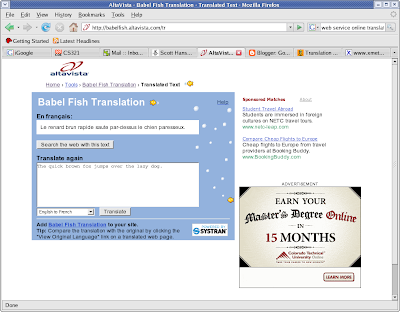


...okay, great. So it managed to do this basic translation, pretty easily. But maybe I don't want "fox" translated. AltaVista instructs users to wrap "fox" in "x" characters, which results in something like:


...seems obvious enough. But wait--notice that the no-translate specifiers (x) are left in the output. I have to manually remove the x's from the output. Slop, baby, slop. How about this:


Call me crazy, but I don't remember "l'examplesx de xextra" being in the French lexicon. And something tells me they aren't going to recall it either. And when it comes to language, the French may be the last people in the world you want to piss off. But I digess.

So one thing is pretty obvious: the characters that BabelFish has chosen to designate sections of text as "do not translate" are insufficient; this should be totally obvious to even the most stupid programmer, since attempting to parse out x's from English text is going to be problematic, given that character is used (somewhat infrequently, I must admit, but why use a letter in the language itself?). And why not go with the (more) obvious (but still incredibly stupid) choice of "z", which is encountered half as often as "x" in everyday language? Perhaps their justification was that there aren't words in the English language that start and end with x, but there are phrases like "xextra examplesx", which seems to make BabelFish's parser throw a temper tantrum.

This character selection snafu probably also explains why they're left in the output; good luck removing something as unspecific as "x" from the output. Because of this, our application has a post-processing step where we search for our wrapped phrases, and then replace them with the originals before the x's were inserted.

All of this begs the question: why not use something that is obviously not an element of the English language, or any other linguistic language, for that matter? Personally, I would propose something like:

<NoTranslate lexcat="">section to not translate</NoTranslate>

...which would have made the aforementioned sentence:

I need <NoTranslate>extra examples</NoTranslate> of this leaping fox.

...or maybe:

I need extra examples of this leaping <NoTranslate lexcat=noun>fox</NoTranslate>.

..."lexcat" is an idea I had (no idea how feasible or practical it is) to give the translator some idea of what is contained in the parenthesis to perform a more concise translation. The context would be for the source language, which would (hopefully) aid in translation to the target language. I suppose other attributes could be added based on the source language (maybe gender would be useful for French, for example). Anyways, with this way of marking text, it is clearly obvious what part you don't want translated. The odds of someone encountering <NoTranslate></NoTranslate> in everyday parlance are pretty damn low.

Unfortunately, this is hardly the beginning of the crap translation service offered. Consider multi-line translations, such as:

Here's the first line to be translated.

This is a leaping fox.

...translates to:

Voici la première ligne à traduire. C'est un renard de saut.

...the problem here is pretty obvious: the translator didn't preserve line breaks. The output should have had a break between the two sentences. This is almost an even bigger issue for automating translation--one option we've kicked around is inserting some xLINEBREAKx word where there's a \r\n; without modifying the input, the location of line breaks is lost in the output. Yet another pre/post processing step to add.

The really sad thing is we've looked for better translation services, and this is actually one of the better ones. Google's service is (surprisingly) even more deficient; rather than using x's as no mark, you use a single "." at the front of a word or phrase you don't want translated. Gee, who uses periods these days? I think I'll go and remove all of the periods from my writing from now on.

Tuesday, September 18, 2007

Pseudo Language


I'm currently converting a substantial application to be Internationalized and Localized. This basically means we're completely abstracting the language from the application, so we can easily have French, German, Italian, and other languages displayed in our application.

In addition to internationalization, we also do localization, which means the way we format dates, times, currency and other "things" are specific to a given locale. For example, there are French speaking people in both Canada and France, but the way they represent numbers, dates, times, and currency can drastically vary, so it's important to have formatting specific to both locales.

To help us with this, we have a bunch of cool, nifty tools. One of the tools we have is some code that generates a pseudo language. The pseudo language is basically a fake language that reads like English, but looks obviously different. The pseudo strings end up looking sort of like the original strings, but with heavily modified characters, and additional padding on the beginning and end of the strings. For example, the string:

The quick brown fox jumps over the lazy dog.

...becomes:

[!!! Ťħĕ qǔĭčĸ þřŏŵʼn ƒŏχ ĵǔmpš ŏvĕř ťħĕ ľäžЎ đŏğ. !!!]

The idea behind the additional length (which, by the way, is variable depending upon the length of the original string) is to ensure there's enough room on the forms in case the translation ends up being substantially longer than the original. The idea behind the modified language is to have some obvious way of determining that our application isn't loading English strings (which, for reasons that shall remain unexplained, can be sort of a pain in the butt on .NET). It's also nice because it gives a visible indicator of places that aren't being translated.

One issue we quickly found, however, was that our pseudo translator was rather stupid. The following string, which contains .NET String.Format arguments:

This is a string with String.Format parameters: {0:D}

...would end up looking something like:

[!!! Ťħĭš ĭš ä šťřĭʼnğ ŵĭťħ Šťřĭʼnğ.Fŏřmäť päřämĕťĕřš: {0:Đ} !!!]

The issue with this, of course, is that {0:Đ} doesn't mean anything to String.Format--{0:D} means something to String.Format. So, we had to modify the code to be aware of {} blocks and not attempt to translate the contents. In theory, this sounded straight forward, but it ended up being a bit involved. One thing is that "{{" and "}}" is how String.Format escapes the "{" and "}" characters, so a perfectly valid String.Format statement is:

This {{{0}}} is a {{ totally valid {{ String.Format statement.

...or maybe:

This is yet another perfectly valid String.Format argument: {{{0:D}{{Hello World!}}

...in the first, String.Format produces "This {0} is a { totally valid { String.Format statement." (the "0" can end up being any number of things, but the point is it's going to be wrapped in {} in the output) The second ends up looking like "This is yet another perfectly valid String.Format argument:{0:D{Hello World!}" So for inner {}, String.Format interprets those as places for format arguments. Any outside {{ or }} get interpreted as braces in the resulting string.

The solution I used kept track of the previous character. If I encountered {{ or }}, I reset the previous character. Any single instance of { encountered resulted in no translation until a } was encountered.

Wednesday, September 12, 2007

Leaking Memory with Marshal.AllocHGlobal

The other day I was going through the source code in our application and tidying up various internationalization tasks, and I came across the following code:

IntPtr BinaryValue = Marshal.AllocHGlobal(8 * Marshal.SizeOf(new byte()));

I quickly noticed that this call didn't have the requisite Marshal.FreeHGlobal call, which basically meant it would leak 8 bytes every time this code was executed. Going through the application, I then found ~15 other places, each of which would leak anywhere from a few bytes up to a couple hundred.

Leaking memory in .NET? Say it isn't so! According to the documentation, the Marshal class:
Provides a collection of methods for allocating unmanaged memory, copying unmanaged memory blocks, and converting managed to unmanaged types, as well as other miscellaneous methods used when interacting with unmanaged code.

So one important thing to keep in mind with the Marshal class is that it was specifically crafted to allow .NET to interact with unmanaged memory, among other things. This means particular care must be exercised, because many of the methods have requisite cleanup steps, or deal directly with memory. Admittedly this can be difficult to cope with, especially after programming in a language where memory management is typically handled entirely under the covers.

Anyways, after finding and establishing that the above code was leaking memory, the question quickly moved on to: what is the best way to make sure memory is always released? Anybody who matriculated to the .NET world from C++ is acutely aware of the perils of non-deterministic finalization, so wrapping it in a class and relying on a destructor is out of the question. One quick/dirty solution a co-worker of mine proposed was a try/catch/finally block:

IntPtr BinaryValue = IntPtr.Zero;
try
{
BinaryValue= Marshal.AllocHGlobal(8 * Marshal.SizeOf(new byte()));
}
catch(Exception)
{
}
finally
{
if (BinaryValue != IntPtr.Zero)
{
Marshal.FreeHGlobal(BinaryValue);
}
}

...the benefit of this is, the finally block will execute regardless of how this code exits. Also, the catch block can be omitted and the finally block will still execute, so this code is also nice for places where it'd be better for the caller to handle the exception.

Another option is the using statement (not to be confused with the using directive). The using statement is actually one way to make .NET behave in a more deterministic manner; once the using block goes out of scope, objects declared in the using block will be zapped from memory. The only requirement is that the object declared in the using statement has to implement IDisposable, so this means we have to wrap Marshal.AllocHGlobal in a wrapper class. I wrote a quick and dirty wrapper class:

class UnmanagedMemory : IDisposable
{
private IntPtr _ptrToUnmanagedMemory = IntPtr.Zero;

public UnmanagedMemory(int amountToAllocate )
{
_ptrToUnmanagedMemory = Marshal.AllocHGlobal(amountToAllocate);
}

public IntPtr PtrToUnmanagedMemory
{
get { return _ptrToUnmanagedMemory; }
}

public void Dispose()
{
if (_ptrToUnmanagedMemory != IntPtr.Zero)
{
Marshal.FreeHGlobal(_ptrToUnmanagedMemory);
_ptrToUnmanagedMemory = IntPtr.Zero;
}
}
}

...pretty straight forward. Using this class then looks like:

using (UnmanagedMemory um = new UnmanagedMemory(8 * Marshal.SizeOf(new byte())))
{
// Do something here with um.PtrToUnmanagedMemory
}

...if you set a break point right after the using block exits, and one in the Dispose method of UnmanagedMemory, you can see the "deterministic" finalization in action. This method is a little more involved, but probably preferable; the UnmanagedMemory class could be expounded upon to provide any number of useful features, and it's cleaner and more object oriented than the try/catch/finally block.

(worth noting is that the using statement is essentially a try/catch/finally block, under the covers, but it is still fundamentally different to wrap unmanaged memory in a class and interface with it like that. I believe this method is preferable)

In our application, we ended up using the try/catch/finally block, mostly because of circumstances inside the company (release coming up, can't do anything too wild) and because I needed tight control over the exception flow so I didn't have to fundamentally alter any of our error handling code. Eventually, though, I'll head over to using something like UnmanagedMemory.

Monday, June 04, 2007

Population of Rome, Continued

Another question often pondered when people discuss the population of ancient cities is: what was the average life expectancy? The formula for computing the average expectation of life is pretty simple:

AverageExpectationOfLife = SumOfTotalYearsLived / TotalIndividualsRecorded


The above formula is basic enough, but Tim G. Parkin, author of Demography and Roman Society, points out the rub:

The simple equation...may often produce what appears to be a realistic figure for average life expectancy, but when ages at death are sorted into age groups (say, 0-1 years, 1-9, 10-19, etc.), serious problems become evident. That infant mortality (i.e., deaths in the first year of life) is grossly underrepresented in the tombstone records has long been recognized; clearly infant deaths, even when burial took place, went largely unrecorded, or at least any such records have not survived in large numbers.


...in other words, infant mortality skews the number so heavily that one thinks of the average lifespan as being low, but people surviving past childhood have a good shot at living much more reasonable (by modern standards, anyway) lifespans. This book also contained some eye opening information on Roman demographics, and it seems the same uncertainty surrounding the estimation of water abounds.

Another interesting point discussed in the book is the ratio between sexes; Beloch and previous authors (Carcopino's Daily Life in Ancient Rome: The People and the City at the Height of the Empire., for example) assumed an equal sex ratio. The evidence put forth by Parkin suggests otherwise, although he makes it quite clear that even his evidence may be off:

Another very striking feature when considering the thousands of epitaphs collected is the preponderance of males over females. If we assume for the moment that in reality the sex ratio over all age groups was approximately equal, this means that in our sample three males were commemorated for every two females...It is true that there is some other evidence...that suggests that males really did outnumber females in certain periods of antiquity.


Another question: how many children did Roman families have? And were the Romans generally monogamous, or did males sometime take multiple wives? The latter question was answered with relative ease: the Romans were monogamous, and generally frowned on polygamy. The former is perilous. Given an average life expectancy of 25 years, a gross reproductive rate of over 2.5 is required to require a stationary population. In other words, each woman needs to bear 2.5 daughters, or about five children. More than that would be population growth; less would be decline. That said, Parkin brings up many issues with estimating Roman family size:
  • It was known how may children were born (or often only sons), but not how many survived to adulthood.
  • Large families may be mentioned because they were abnormal, skewing modern perceptions.
  • Daughters often remained anonymous or unmentioned.
  • Ancient authors rarely show any demographic interest in average family size.


Through Roman Egyption census records, the average size of households was calculated to around six, including parents and slaves.

Based on the information Parkin brings up, it seems like it should be possible to refine Beloch's